

Appearance
Configuring The Points System
Points are the score behind the leaderboard and member levels. In FluentCommunity, a member earns points when other people react to the content they posted. There is no separate score for posting, commenting, or reacting to someone else's content.
IMPORTANT
The point formula is fixed. You cannot assign custom point values for simply writing a post or leaving a comment. Instead, you can control the milestone ladder that those earned points unlock.
How Points Are Calculated
A member's total is the number of reactions their published content has received:
Total points = reactions on their published posts
             + reactions on their published comments
Every reaction is worth 1 point.
- Writing a post earns 0 points on its own. It earns points once other members react to it.
- Leaving a comment earns 0 points on its own. It earns points once other members react to that comment.
- Giving a reaction earns the giver nothing. The point always goes to the author of the reacted content.
- Removing a reaction removes the point. Totals follow the current reaction count.
- Deleted or unpublished posts and comments stop counting.
NOTE
Point totals do not update instantly. The system recalculates scores about once per hour when a member loads the portal, alongside a daily background refresh. A short delay between a reaction and an updated score is normal.
Configure Your Level Settings
To build your gamification ladder:
- Navigate to Portal Settings and open Features & Addons.
- Find the Leaderboards Module and click Settings.
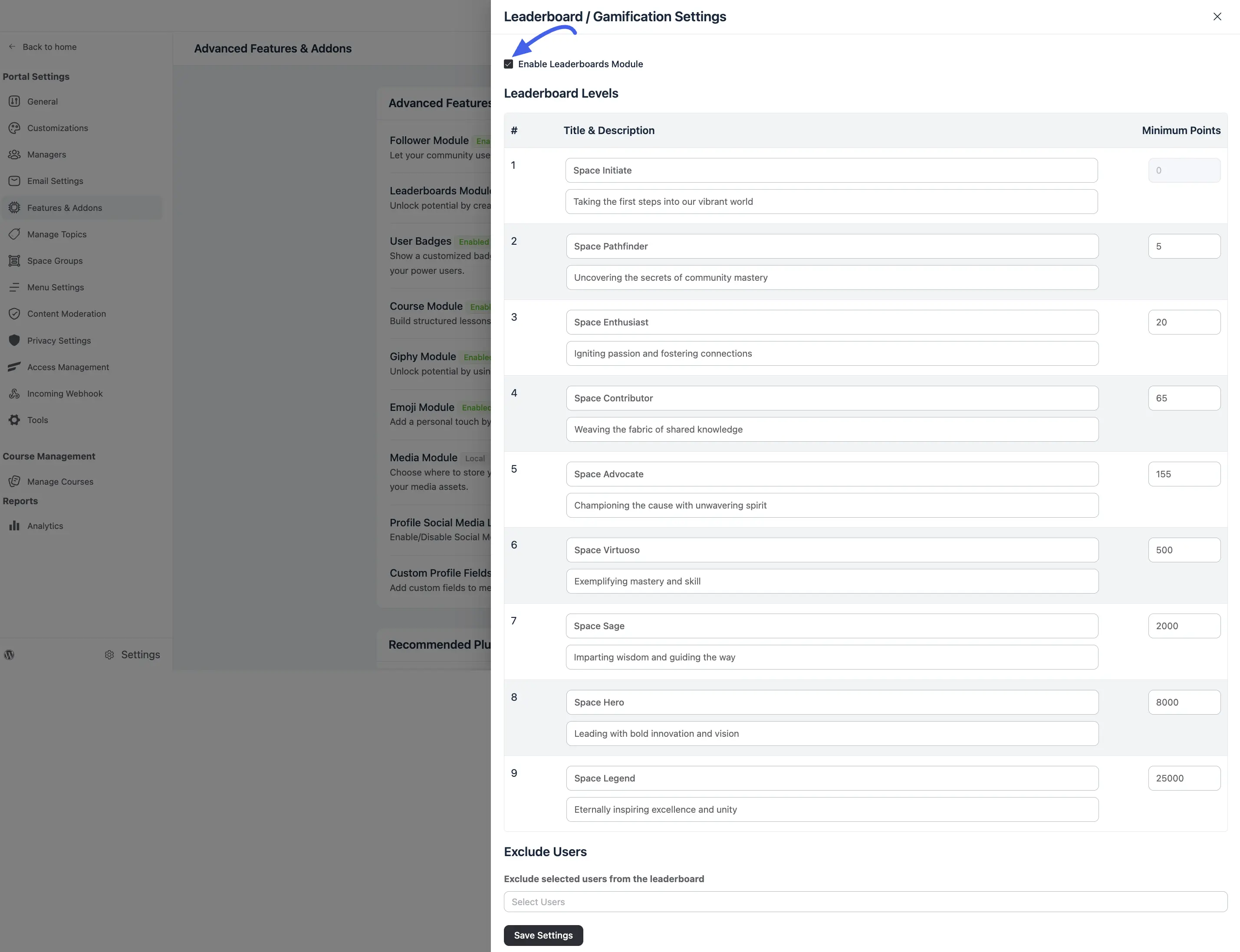
- Inside the expanded drawer, define your Leaderboard Levels across nine rank tiers.
- For each tier row, enter a public Title & Description (e.g., Space Initiate).
- Set the Minimum Points required to unlock that specific rank.
- Click Save Settings to apply your changes. For the step-by-step walkthrough, see Setting Up Leaderboards.
Tuning The Ladder
Because 1 point equals 1 reaction, you shape community progression entirely by adjusting the minimum point thresholds.
Here are the system defaults:
| Level | Default title | Minimum points |
|---|---|---|
| 1 | Space Initiate | 0 |
| 2 | Space Pathfinder | 5 |
| 3 | Space Enthusiast | 20 |
| 4 | Space Contributor | 65 |
| 5 | Space Advocate | 155 |
| 6 | Space Virtuoso | 500 |
| 7 | Space Sage | 2,000 |
| 8 | Space Hero | 8,000 |
| 9 | Space Legend | 25,000 |
TIP
One point equals one reaction, so 25,000 points means 25,000 reactions. That is out of reach for a small or new community. If members feel stuck at Level 1 or 2, lower the thresholds. Keep Level 1 at 0 so every new member starts on the ladder.
Use Case: A community of 200 members where good posts collect 5–10 reactions could set the ladder to 0 / 5 / 15 / 40 / 100 / 250 / 600 / 1,500 / 4,000, so an engaged member can realistically reach the top tiers within a year.
Where Points Appear
- Member profiles: Displays the user's total accumulated points and their current level title.
- Leaderboards: Ranks the top 10 members across 7-day, 30-day, and all-time windows. Time-limited boards only count reactions earned within that specific timeframe, allowing newer members to compete for the weekly top spot without needing a massive lifetime total.
- Level upgrades: Level upgrades trigger an event that you can use to launch automated email workflows if you have FluentCRM active.